Filament Address Pro
Provides international address capture, verification, and management for Filament 4 and 5: dynamic country-aware forms, multiple verification APIs (USPS, Smarty, Google), geocoding, and comprehensive reference data spanning 256 countries. Highly configurable and customizable.
Overview
Every application that handles addresses faces the same problem: international formats vary wildly, verification APIs have different coverage and pricing, and building a form that works correctly across 256 countries is a project in itself.
Filament Address Pro is a complete solution. The address form dynamically adapts fields, labels, and validation rules to each country. Backed by 17,000+ authoritative subdivisions that ship with the package.
Addresses reference subdivision records by ID, not by name or code, so GROUP BY administrative_area_id gives you canonical US states and territories — not inflated by "NY", "N.Y." as separate buckets. Fuzzy matching resolves typos and abbreviations at write time so they never reach your database. Dropdowns show local names alongside English, and postal codes auto-populate subdivisions for countries whose systems support this. No third-party data subscription, no runtime API calls for reference data.
Google Places Autocomplete fills the form with a single selection using session-token billing, and blur geocoding handles paste-and-tab workflows for staff who prefer typing. The verification pipeline routes addresses automatically: USPS with DPV confirmation for the US, Smarty for 240+ international countries, or Google Address Validation. Results are cached, usage is tracked per request, and a silent mode runs verification on save for public-facing forms - no dialog, no friction.
Built for Filament 4 and 5, Laravel 11–13. Production-tested with 1,302 automated tests.
Features
Address Form
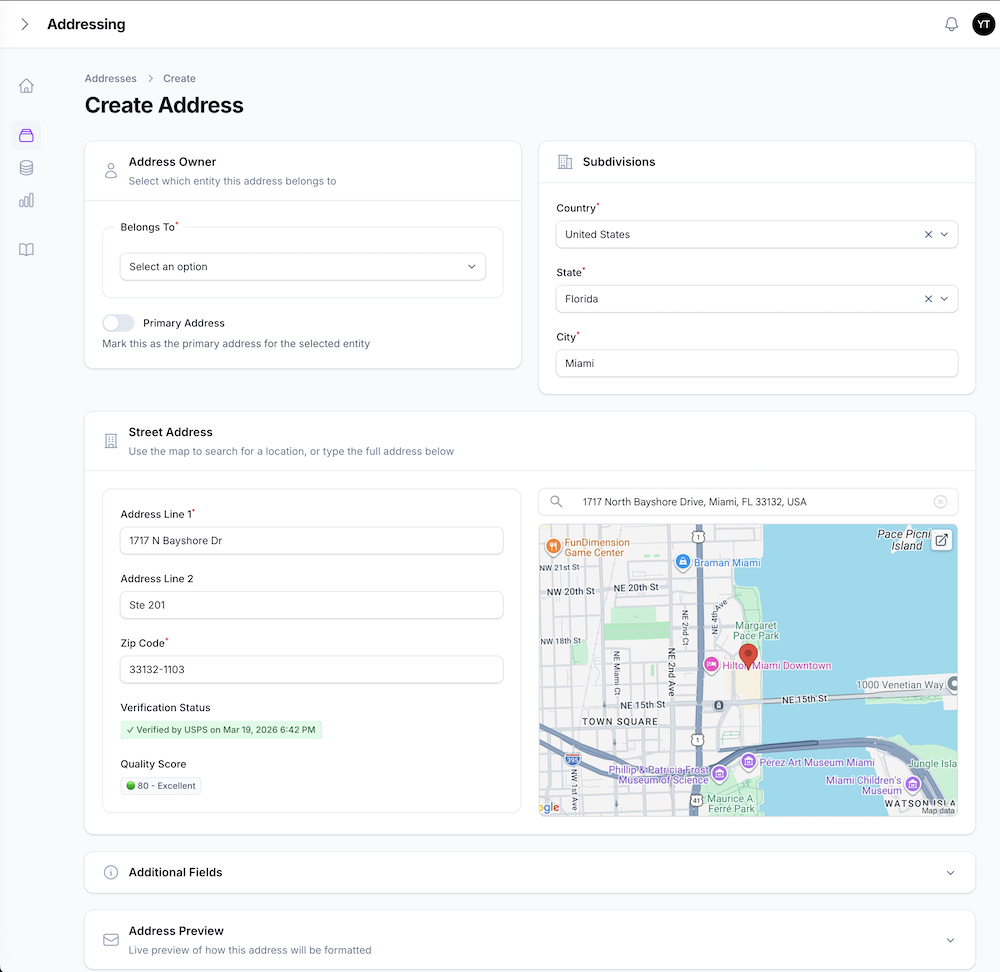
- 256 Countries Supported • Dynamic fields, labels, and validation adapt to each country's address format
- Address Search Field • Google Places Autocomplete with static map preview (session-token billing, billed per selection, not per keystroke)
- Four Input Modes •
autocomplete(Places search),geocoding(blur auto-fill),manual(no API calls), orauto(best available based on your API keys) - Blur Geocoding • Auto-fills address components when users tab out; handles paste-and-tab workflows with configurable completeness thresholds
- Live Preview • Real-time formatted address display in both international and domestic formats
- Duplicate Detection • Warns when a new address matches an existing one on the same entity
Subdivision Data
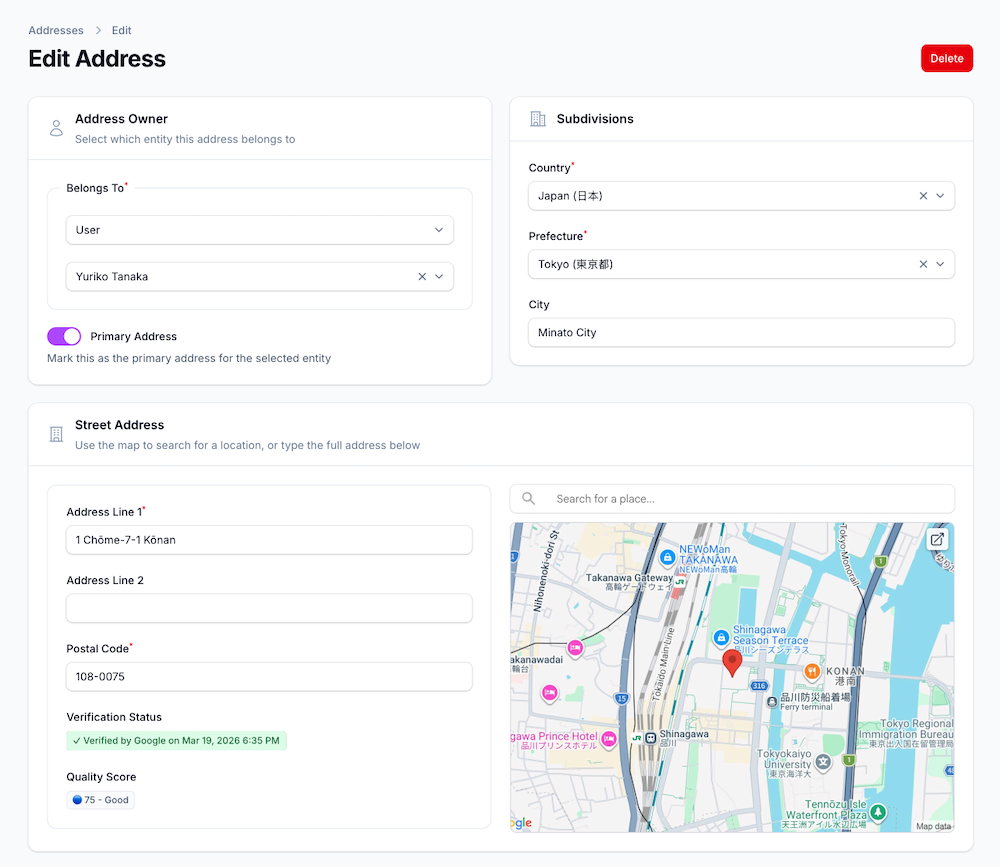
- 17,000+ Authoritative Subdivisions • States, provinces, cities, districts seeded from package data, no external service required
- ID-Based Storage • Addresses reference subdivisions by ULIDs, not ambiguous text (clean BI and reporting at high granularity)
- Fuzzy Matching • Absorbs typos and abbreviations on import (Masachusetts → Massachusetts, TX → Texas)
- Local Names • Dropdowns display local names alongside English, facilitating search in either language
- Hierarchical Queries • Parent-child chains enable drill-down (country → state → city → district)
- Postal Code Resolution • Typing a postal code auto-populates subdivision fields, for countries supporting this (FR, DE, ES, IT, NL)
Verification
- Multi-Provider Pipeline • USPS (US), Smarty (240+ countries), Google Address Validation (~40 countries)
- Smart Auto-Routing •
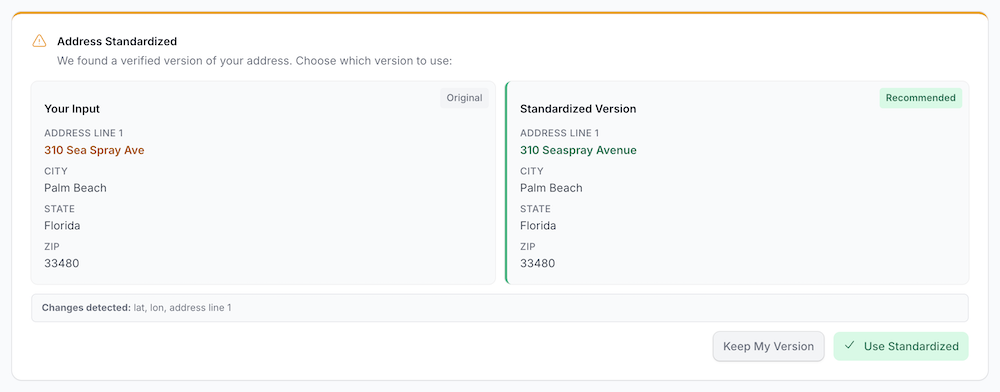
provider=autoroutes by country: USPS for US, Smarty-first for 155 DeliveryPoint-precision countries, Google-first for all others - Interactive Mode • Side-by-side dialog shows user input vs. standardized version; user chooses
- Silent Mode • Runs verification on save with no dialog - ideal for public-facing forms
- Geocoding Confidence Scoring • Google
location_typeflags low-confidence results for review - Sanity Checks • Catches blank street lines, empty cities, and cross-country postal code mismatches
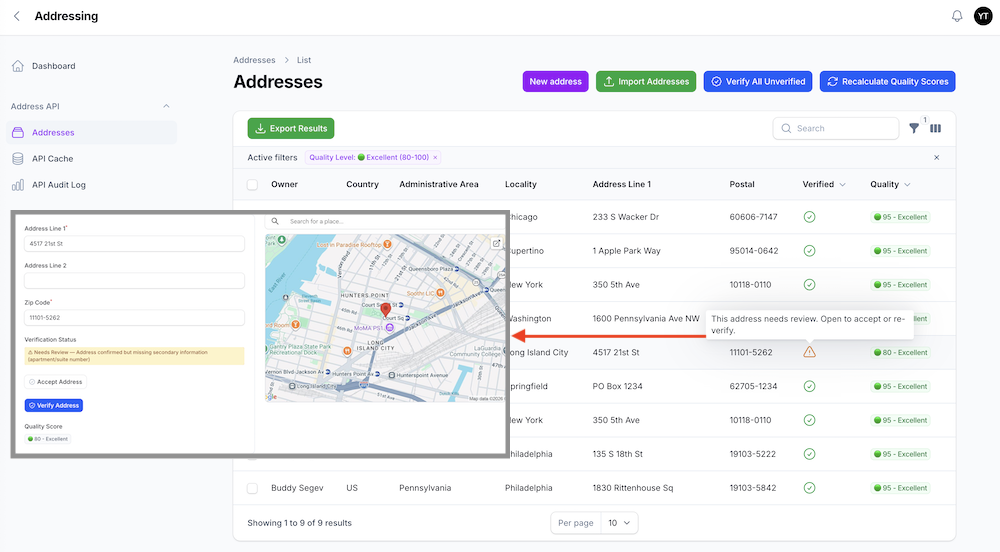
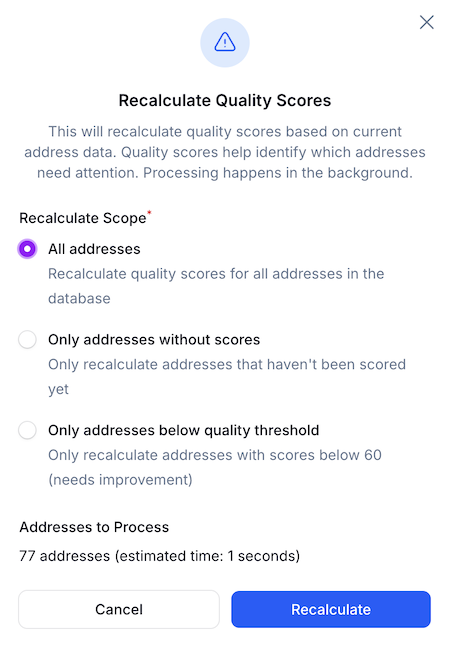
- Quality Scoring • 0–100 score per address (completeness, verification status, coordinates, recency)
Bulk Operations
- Import • CSV/Excel import with fuzzy subdivision matching, entity type whitelisting, and error reporting
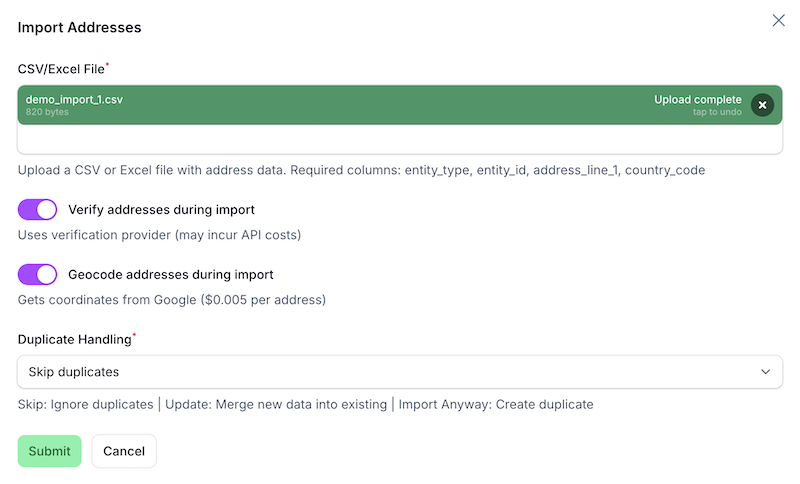
Export • Download addresses as CSV/Excel with formatted output
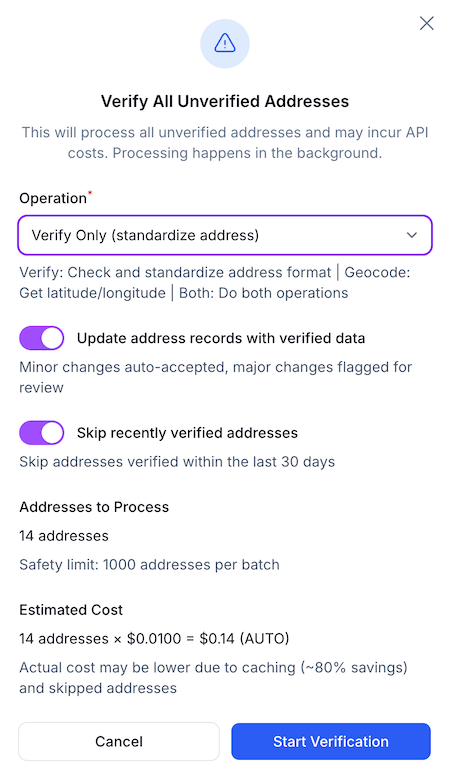
Bulk Verification • Verify multiple addresses in batch with change detection and review workflow
- Bulk Quality Scoring • Score multiple addresses in batch
Admin Panel
- Four Dashboard Widgets • Address stats, API usage tracking, quota monitoring for USPS and Smarty APIs
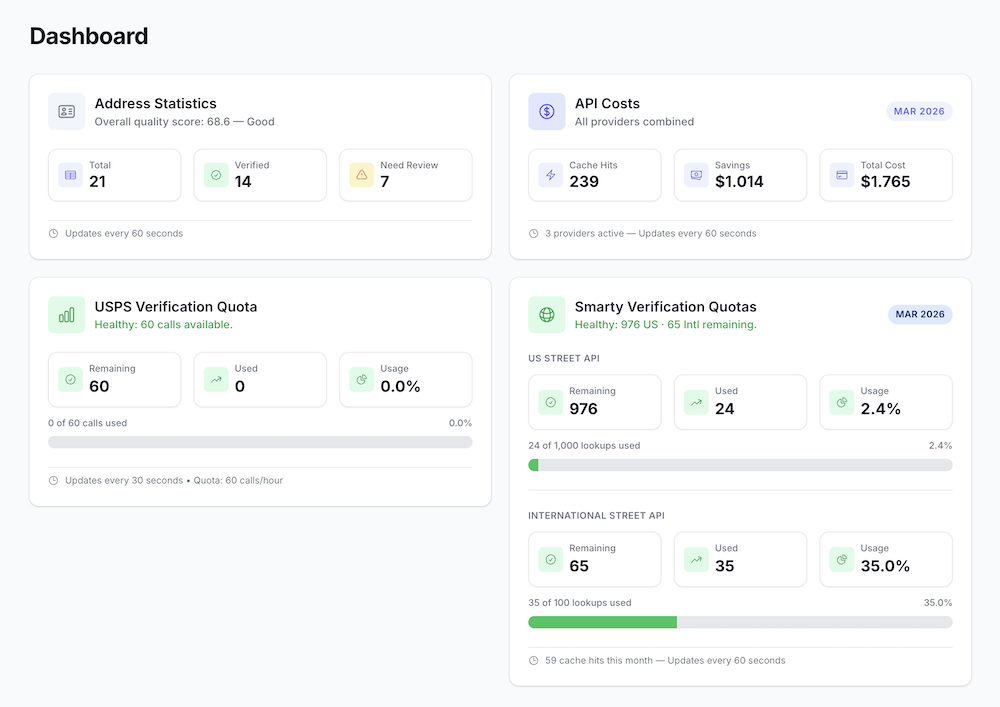
- Two Monitoring Resources • API cache browser and audit log viewer with cost analytics
- Three Panel Delivery Options • Built-in provider (zero config), add to existing panel, or publish a customizable copy
Infrastructure
- API Caching • Dual-table design with hot cache (TTL-based) and permanent audit log
- Authorization • Policy-based access control with automatic Spatie Permission detection
- Primary Address Management • One primary address per entity, enforced at the model level
Quick Start
New to the package? See INSTALLATION.md first — it covers Composer authentication, CI/CD setup, and step-by-step instructions for both fresh and existing Filament apps.
# 1. Install the package
composer require viewflex/filament-address-pro

# 2. Run the setup wizard - handles migrations, country data, and panel setup
php artisan addresses:install
Add your Google Maps API keys to .env:
# Recommended: separate keys with different restrictions (see CONFIGURATION-GUIDE.md)
GOOGLE_MAPS_SERVER_KEY=your_server_key    # IP-restricted: Geocoding + Static Maps APIs
GOOGLE_MAPS_BROWSER_KEY=your_browser_key  # Domain-restricted: Maps JavaScript + Places APIs

# Or single-key fallback (simpler, less secure)
# GOOGLE_MAPS_API_KEY=your_google_maps_api_key
Add the trait to any model that needs addresses:
use Viewflex\FilamentAddress\Concerns\HasAddresses;

class User extends Authenticatable
{
    use HasAddresses;
}
Add the relation manager to its Filament resource:
use Viewflex\FilamentAddress\Filament\RelationManagers\AddressesRelationManager;

public static function getRelations(): array
{
    return [
        AddressesRelationManager::class,
    ];
}
Visit /addressing - the full address management panel is live.
See: Configuration Guide for API keys, verification providers, input modes, blur geocoding, UI options, and panel setup.
How It Works
Address Input Flow
The form behavior depends on the configured input mode (ADDRESS_INPUT_MODE):
| Mode | Behavior | API Keys Required |
|---|---|---|
autocomplete | Google Places Autocomplete fills all fields from a single selection | Browser key |
geocoding | User types manually, blur auto-fills components on tab-out | Server key |
manual | No API calls, user fills every field by hand | None |
auto | Best available mode based on which API keys are configured | Any |
Regardless of mode, the flow is:
- User selects country → Form loads country-specific field configuration
- Dynamic fields appear → State, city, district dropdowns populated from seeded subdivision data
- Address entry → Places autocomplete, blur geocoding, or manual input (depending on mode)
- Verification → Autocomplete selections are treated as verified automatically. For geocoding/manual entry: click Verify for the side-by-side comparison dialog (interactive mode), or configure silent mode to verify on save with no dialog
- Quality scoring → Completeness, verification, coordinates, and recency scored 0–100
- Live preview → Formatted address updates in real-time
Geocoding Service
The GeocodingService handles forward geocoding and address component extraction:
use Viewflex\FilamentAddress\Services\GeocodingService;

$geocoder = app(GeocodingService::class);
$result = $geocoder->geocode('1600 Amphitheatre Parkway, Mountain View, CA', 'US');

if ($result['success']) {
    $lat = $result['lat'];
    $lon = $result['lon'];
    $components = $result['components'];

    // Components include:
    // - street_number, route, address_line_1
    // - city, state, state_abbr
    // - postal_code, dependent_locality
}
Verification is a separate step via AddressProcessingService::applyVerification(). See the Verification Guide.
Subdivision Matching
Geocoding APIs and data imports rarely return subdivision names in exactly the form your database expects. The matcher bridges that gap automatically, resolving any of these to the same canonical subdivision record:
| Input | Resolves to | Why it works |
|---|---|---|
"Tokyo" | 東京都 (Tokyo-to) | English name match |
"東京都" | 東京都 (Tokyo-to) | Local name (name_local) match |
"JP-13" | 東京都 (Tokyo-to) | ISO 3166-2 code match |
"13" | 東京都 (Tokyo-to) | ISO code suffix match |
"Genève" | Geneva | Accent-normalized match |
"Geneva" | Geneva | Accent-normalized match |
"CA" | California | Abbreviation code match |
"California" | California | Exact name match |
"Califronia" | California | Levenshtein typo tolerance (≤ 2 edits) |
"New York County" | New York | Substring match |
"City of San Francisco" | San Francisco | Substring match |
This matters in practice because Google geocoding returns "Tokyo" while the DB stores "東京都", or an import CSV uses state abbreviations while the DB stores full names. Matching happens transparently across all input paths — geocoding, Places autocomplete, import, and manual entry — using the same priority chain:
- Abbreviation / local code — exact, case-insensitive (
CA,13) - ISO 3166-2 code — with or without country prefix (
US-TX,TX) - English name — exact, case-insensitive
- Accent normalization — strips diacritics before comparing (
Genève→Geneva) - Local name (
name_local) — exact and accent-normalized (東京都,Île-de-France) - Substring — either string contained in the other, length-ratio guarded to prevent false positives
- Levenshtein distance — accepts up to 2 character edits for typo tolerance
Working with Addresses
// All addresses for a model
$addresses = $user->addresses;

// Primary address
$primary = $user->primaryAddress();

// Verified addresses only
$verified = $user->verifiedAddresses();

// Set primary (clears previous)
$user->setPrimaryAddress($address);

// Query scopes
Address::verified()->get();
Address::unverified()->get();
Address::verifiedBy('usps')->get();
Formatting Addresses
use Viewflex\FilamentAddress\Services\CountryService;

// International format (includes country)
$formatted = CountryService::formatAddress('US', [
    'first_name'          => 'Jane',
    'last_name'           => 'Smith',
    'address_line_1'      => '1600 Pennsylvania Ave NW',
    'locality'            => 'Washington',
    'administrative_area' => 'DC',
    'postal_code'         => '20500',
]);
// Jane Smith
// 1600 Pennsylvania Ave NW
// Washington, DC 20500
// UNITED STATES

// Domestic format (no country)
$formatted = CountryService::formatAddressLocal('US', [...]);
Embedded Address Fields
If you prefer columns directly on your entity table instead of the polymorphic addresses table:
// ⚠️ Subdivision IDs are ULIDs, not integers - use ulid()
$table->ulid('administrative_area_id')->nullable();
$table->string('administrative_area')->nullable();
$table->ulid('locality_id')->nullable();
$table->string('locality')->nullable();
See: Implementation Patterns for complete migration and form examples.
Custom Verification Provider
use Viewflex\FilamentAddress\Services\Verification\VerificationProvider;
use Viewflex\FilamentAddress\Services\Verification\VerificationResult;

class MyProvider implements VerificationProvider
{
    public function verify(array $address): VerificationResult { /* ... */ }
    public function supportsCountry(string $countryCode): bool { /* ... */ }
    public function getName(): string { return 'my-provider'; }
    public function isConfigured(): bool { return !empty(config('services.my.key')); }
}

// Register in a service provider
app(AddressVerificationService::class)->registerProvider(app(MyProvider::class));
Documentation
- Getting Started • Installation, quick setup, and first steps
- User Guide • Comprehensive guide covering all features and workflows
- Configuration Guide • API keys, providers, input modes, blur geocoding, UI settings
- Verification Guide • Provider pipeline, interactive vs. silent mode, confidence scoring
- Panel Setup • Three delivery options, theming, and admin-only access
- Import/Export Guide • Bulk import from CSV/Excel with fuzzy matching
- Public Forms • Silent verification, cost considerations for public-facing forms
- Implementation Patterns • Embedded address fields, multi-address entities, custom forms
- API Reference • Models, services, components, and configuration keys
- Customization Guide • CSS hooks, form extension, custom models
- Code Examples • Practical examples for common use cases
- FAQ • Frequently asked questions and troubleshooting
- Authorization • Policies, Spatie Permission, role-based access
- Admin Panel • Dashboard widgets and monitoring resources
- Licensing • License tiers, activation, and usage terms
- Roadmap • Planned features and upcoming releases
Quality & Testing
Test Coverage (1,302 passing, 12 skipped)
Pure Unit Tests (252): Fast, isolated business logic - extractors, validators, query builder, cache keys
Integration Tests (868): Laravel + Database - models, services, configuration, quality scoring, authorization, pre-release country validation (256 countries)
Feature Tests (72): Full-stack with APIs - geocoding, verification (USPS, Google, Smarty), import/export
Smoke Tests (73): Quick health checks - package health, service instantiation, data integrity
Performance Tests (37): Timing benchmarks - geocoding, subdivision matching, extractor efficiency
# Quick feedback (< 5s)
php artisan test --testsuite=Package-Unit --testsuite=Package-Integration

# Full suite (< 5 min)
composer test
See: Testing Guide | Quick Reference
Requirements
- PHP 8.2+
- Laravel 11, 12, or 13
- Filament 4.0 or 5.0
- Google Maps JavaScript API + Places API (for
autocompleteandgeocodinginput modes; not required formanualmode)
License
Proprietary - Commercial License Required
Support
For support, please visit: viewflex.net/contact
Built with ❤️ by Viewflex